Working in the context of your program (drug discovery)
Last updated: November 12, 2026
Introduction
Programs work best when they are where your work starts, not where it gets filed afterwards. When you begin a question, bring in data or run an analysis from inside a program, Pluto keeps the thread from each result back to the decision it informs. This guide shows how that looks day to day for scientists, program leads and portfolio leaders.
Start from the program
Your Workspace home shows quick stats and snapshots of the programs that matter most to you. Open Programs to jump into one, or use Search at the top of any page to find a program, project or dataset by name.
Once inside a program, the left-hand navigation keeps everything for that program one click away.
Scientists: from question to evidence
1. Check what the program needs. Open the Framework tab and look at Next steps and Coverage gaps. These show which criteria still lack evidence, with a suggested analysis plan for each.
2. Bring in the data. On the Datasets tab, select Search available datasets to link data that already exists in Pluto, including public studies from the Global Data Commons, or select Dataset to add your own. Every dataset you link is visible to the whole program team.
3. Ask the question in an analysis space. On the Analysis spaces tab, create a space for one specific question and state its hypothesis. You can also start from a dataset by selecting Analyze this dataset.
4. Build the story on the canvas. Arrange plots so they read from overview to detail. The Summary tab turns your canvas into key findings and evidence.
5. Connect results back to the framework. Select Align to program in the analysis space so its plots count as evidence against the program's criteria. Coverage on the Framework tab updates to reflect what you have shown.
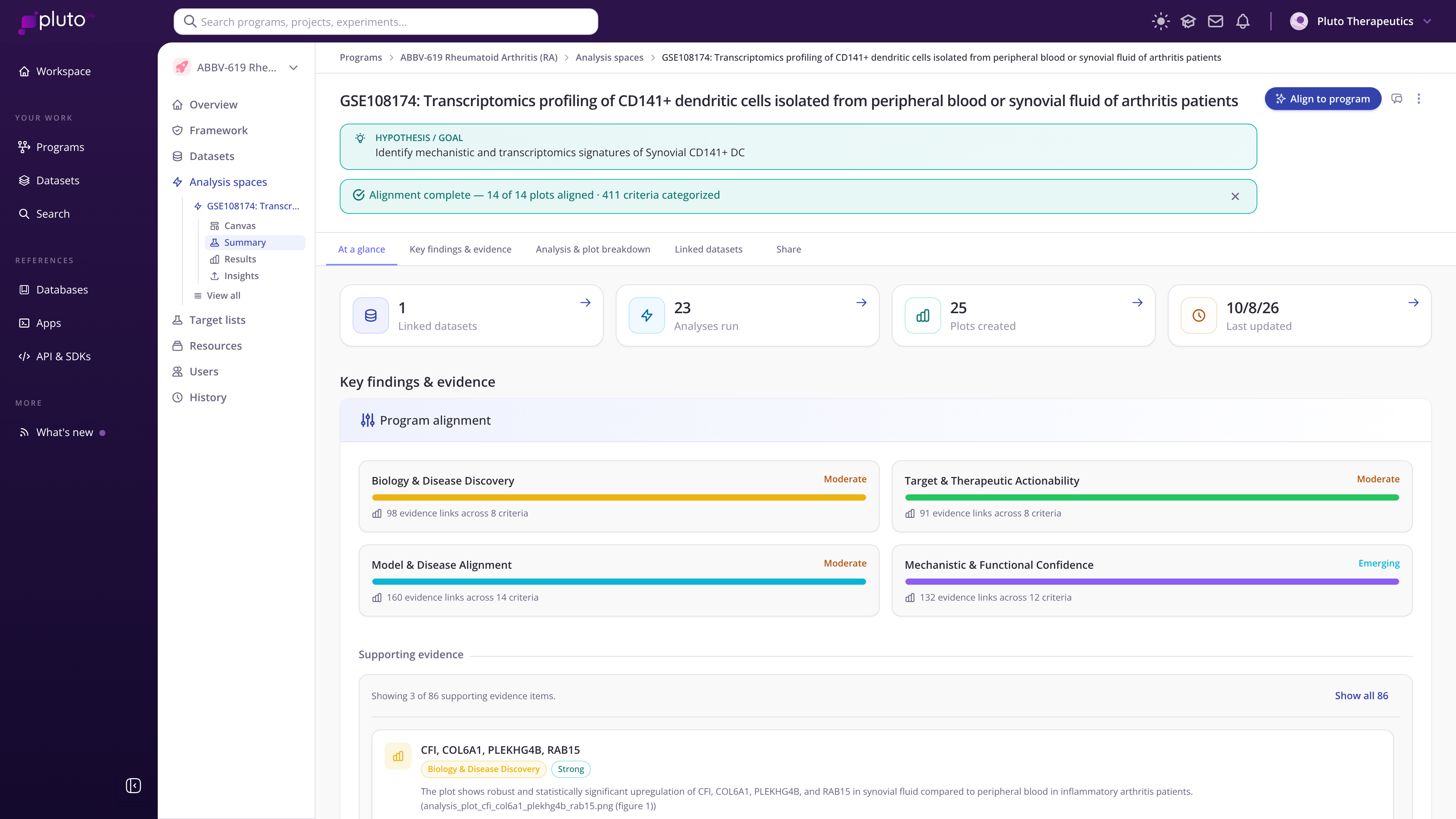
An analysis space summary showing program alignment by dimension
Program leads: keep the program current
Keep context fresh. Use Add context via chat on the Overview's Program context tab after major meetings or decisions. A current context makes Pluto's recommendations more relevant.
Watch coverage, not just activity. The Framework tab shows where the evidence is strong and where it is thin, so you can direct the next experiment.
Move the stage when the decision is made. Update the program's stage so the Kanban board and everyone's views reflect reality.
Check who has access. The Users tab lists who can view and edit the program.
See what changed. The History tab records every change, so you can catch up after time away.
Portfolio leaders: see the pipeline
Switch the Programs page to Kanban and choose a program type to see every program by stage. Each card's coverage bar shows how much framework evidence that program has built, so you can compare programs at the same stage at a glance. Switch back to Table to filter, sort and export by stage, modality, therapeutic area, target, health and next milestone.
Habits that pay off
Name analysis spaces after the question they answer.
Link public datasets to the program rather than downloading and re-uploading them.
Keep Target declared accurate: it changes which analyses Pluto suggests.